
How To

Switch folders

Every service you create actually has three folders:

  • "Inbox" - the main inbox
  • "Suspicious" - this is where messages go when they pass some security/span checks but not all.
  • "Trash" - your trash bin. Messages that pass no security checks will automatically go here.

To switch between them use the dropdown menu at the top of the message list panel.
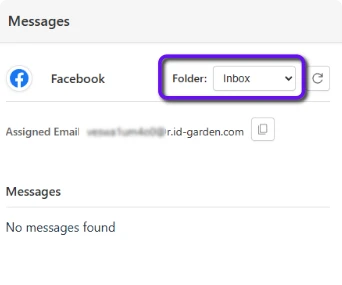
Screenshot: Highlighting the dropdown menu for selecting the current folder at the top of the message list panel


Support home Browse all articles Search Articles Contact us

Legal & Cookies
View Privacy Policy
View Terms and Conditions

Credits

Cookies

The web app part of our site uses functional cookies for authentication, remembering your preferences and otherwise enabling your use of the app. No third party or tracking cookies are used on our site.

Impressum


  • Name of website owner: Defora Networks GmbH
  • Address: Wallstr. 9, 10179 Berlin, Germany
  • Contact: info@defora.net, +49 (0)1556-333672-3
  • Geschäftsführer: Pierre Pronchery
  • Registered in Berlin Charlottenburg HRB: 205522 B