
Forward an email
Why forward?
In Secure ID we only keep emails for 30 days.
We aren't (yet) setup to be the forever home for your emails with deep search functionality and GB of ever expanding storage.
We also argue that 90% of the emails from third party services are not actually data most people need to keep, they just add to a lifetime of digital clutter.
However it's up to you, you can always forward emails to your primary address for storage.
Forwarded emails from Secure ID have the original sender preserved, so they appear in your primary inbox as if they came straight from the original third party service.
How to forward emails to your primary email
There are two ways:
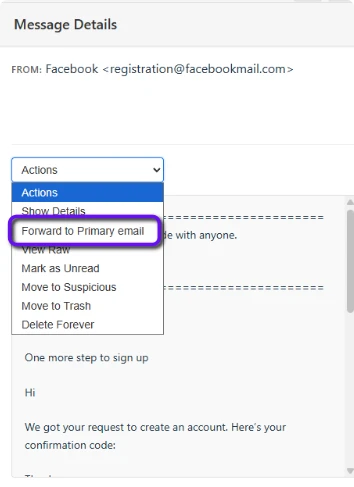
- Using the actions dropdown
- In the selected message panel, above the message body press the 'actions' dropdown
- Press 'Forward to primary email'
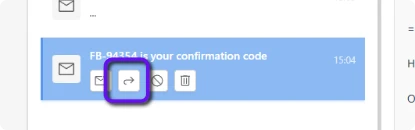
- Using the quick action buttons (not available on mobile)
- Select an email you want to forward in the message list
- Press the small button with the curved arrow icon
In future we will add functionality to forward all emails for a service to your primary email.