Troubleshooting

I can't interact with an email

As part of our beta program, Secure ID does not yet support rich HTML emails, only plain text.

In theory all senders should send workable plain text versions of their emails, but this is not always the case. Particularly if you need to press buttons or follow links in an email

In this case use the forwarding functionality to send the email on to your primary email address.

How to forward emails to your primary email

There are two ways:

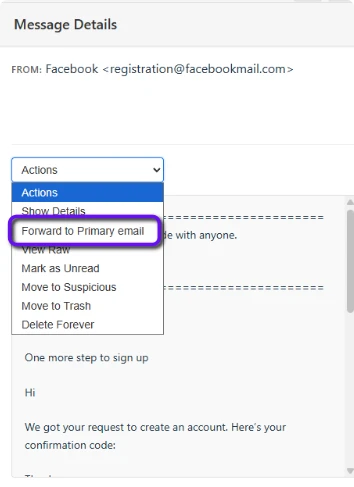
  1. Using the actions dropdown
  • In the selected message panel, above the message body press the 'actions' dropdown
  • Press 'Forward to primary email'

Screenshot: Highlighting the forward message option in the Actions Dropdown above the selected message body

  1. Using the quick action buttons (not available on mobile)
  • Select an email you want to forward in the message list
  • Press the small button with the curved arrow icon
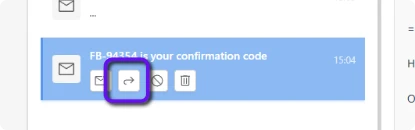
Screenshot: Highlighting the forward message button in the message list panel on a selected message

(Don't see the forwarded email? check your spam folder)

For more info on how to forward emails see here

To see the current status of available features click here


Support home Browse all articles Search Articles Contact us

Legal & Cookies
View Privacy Policy
View Terms and Conditions

Credits

Cookies

The web app part of our site uses functional cookies for authentication, remembering your preferences and otherwise enabling your use of the app. No third party or tracking cookies are used on our site.

Impressum


  • Name of website owner: Defora Networks GmbH
  • Address: Wallstr. 9, 10179 Berlin, Germany
  • Contact: info@defora.net, +49 (0)1556-333672-3
  • Geschäftsführer: Pierre Pronchery
  • Registered in Berlin Charlottenburg HRB: 205522 B